Have you ever felt like your to-do lists were bottomless pits? You keep adding tasks, ticking some off, but completely lose sight of the bigger picture. You don’t know what is blocked, what is under review, or who is working on what.
The solution is not to work more, but to visualize better.
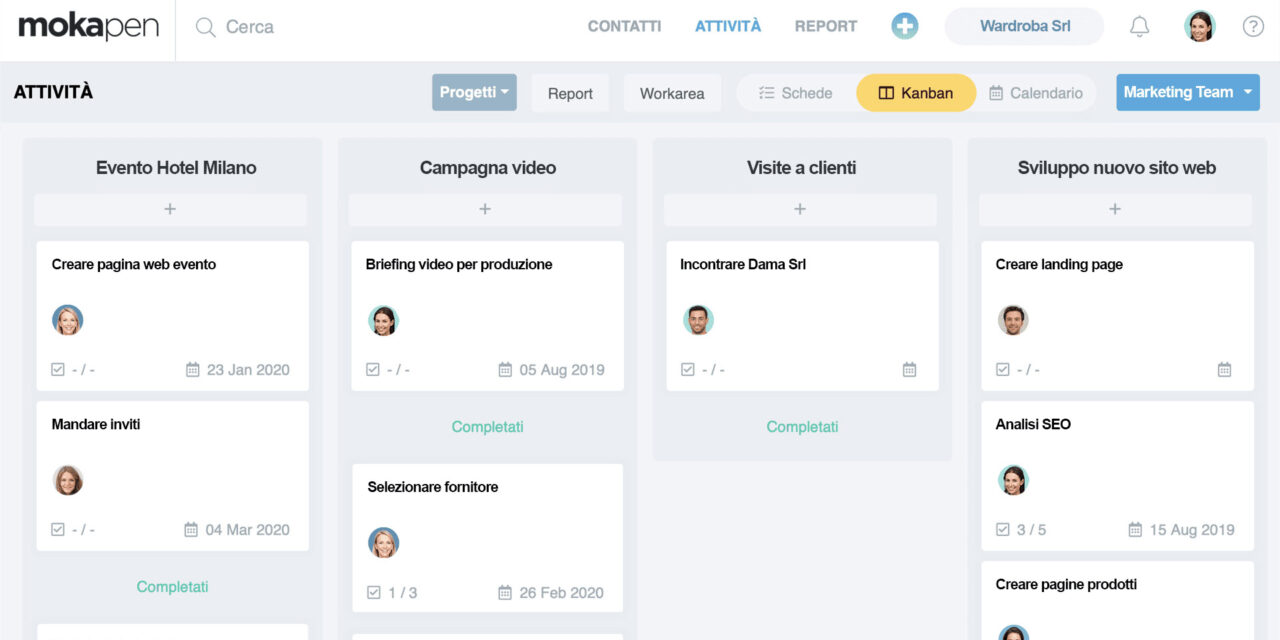
Today we’re talking about the Kanban Board, the ultimate tool for turning static lists into a dynamic workflow, and how Mokapen’s Board View makes all of this incredibly intuitive thanks to drag and drop.
Beyond the List: The Power of Visual Workflow
The human brain processes images much faster than text. When you look at a list of 20 items, your brain often sees only one thing: “work, work, work.”
A Kanban Board, on the other hand, tells you a story. It shows where each task is within its lifecycle. In its simplest form, it consists of three columns: To Do, In Progress, and Done.
The real advantage is the visual workflow. At a glance, you can immediately identify:
- Bottlenecks: If the “In Review” column is overloaded, you immediately know where action is needed.
- Progress: You can physically see work moving from left to right.
- Priorities: Cards at the top of a column take precedence.
The Magic of Drag & Drop
There is something almost tactile and satisfying about moving a task. It is not just clicking a checkbox; it is a physical action that signals progress.
The Drag & Drop feature is at the heart of effective Kanban management. It removes administrative friction: you don’t need to open the task, change its status from a dropdown menu, and save it. You grab it, move it, and you’re done.
This approach reduces cognitive load and turns project status updates from a tedious task into a natural gesture.
The Mokapen Solution: Board View
At Mokapen, we have taken the Kanban methodology and fully integrated it into your project ecosystem with our Board View.
No matter how complex your project is, Mokapen’s Board View allows you to organize it visually in just a few seconds. Here’s why it is the ideal solution for anyone looking for clarity:
1. Fully Customizable Columns
Every team has its own workflow. With Mokapen, you are not limited to the classic “To Do / Doing / Done” structure. You can create columns such as Client Approval, Waiting for Materials, Publishing, and more. The Board adapts to your process, not the other way around.
2. Smooth Drag & Drop
Move cards between stages with a simple gesture. Need to change a priority? Drag the task to the top of the column. Want to move a task to the next stage? Drag it to the right. The update is instant for the entire team.
3. Key Details at a Glance
Cards in Mokapen’s Board View are not just digital sticky notes. They show the assignee, deadline, and priority labels without requiring you to open the task details. You can keep everything under control at a glance.
How to Start Using Board View in Mokapen
- Create a new Project in Mokapen.
- Select the Board view, or switch to it at any time from the List view.
- Define your stages by creating the columns you need.
- Start creating tasks and drag them through the workflow as work progresses.
Stop managing work in an abstract way. Make it visible, tangible, and manageable with Mokapen’s Board View.
Ready to bring order to the chaos?
Don’t let your projects manage you. Take control today.
Mokapen is the intuitive, fast, and powerful tool to plan, track, and deliver your projects on time.